AgentTesla Analysis
Overview
It is a .NET based information stealer readily available to actors due to leaked builders. The malware is able to log keystrokes, can access the host’s clipboard and crawls the disk for credentials or other valuable information. It has the capability to send information back to its C&C via HTTP(S), SMTP, FTP, or towards a Telegram channel. It is also known as AgenTesla, AgentTesla, Negasteal and is utilized by threat actor group SWEED.
SAMPLE - sha256 458c119a3b7fd9a59a26a9f0af3f6490f131d5d5a6a01f293b728645df9f50cc which is unpacked binary of packed binary sha256 e1345fb134e131300974cc55448bdc0f547c13502a298496f0762e09fbe9be7a.
Static Analysis
As always I have downloaded the binary and done a basic search over MalwareBazaar and Virustotal and got info that it was marked by 19 vendors in malbazaar and 51 vendors by virustotal. So it is detectable by EDR’s. It is using file name tmpcih5l97u.exe.
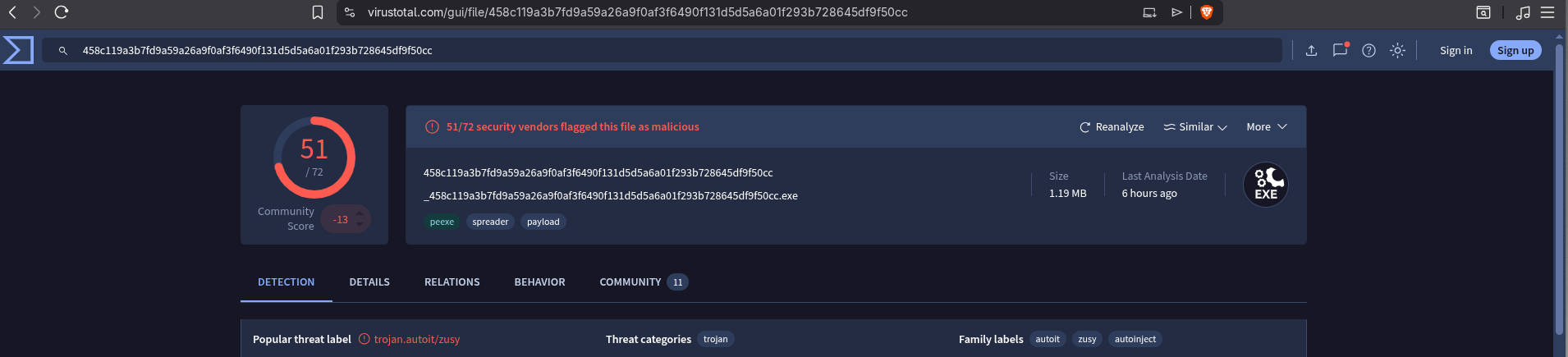 Figure 1: Virustotal
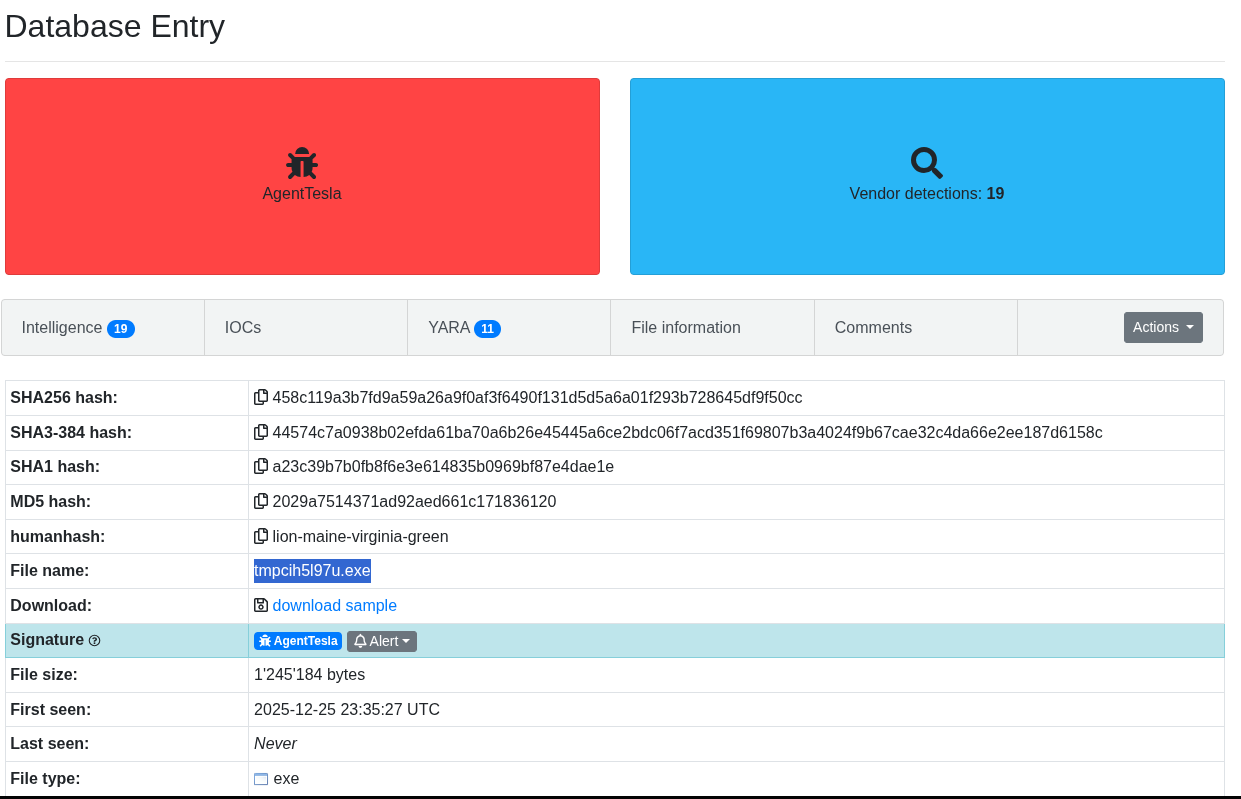 Figure 2: Malware Bazaar
Using DIE, I got to know that its written in C++ and compiled with AutoIt which means a .au3, .a3x script is compiled into .exe.
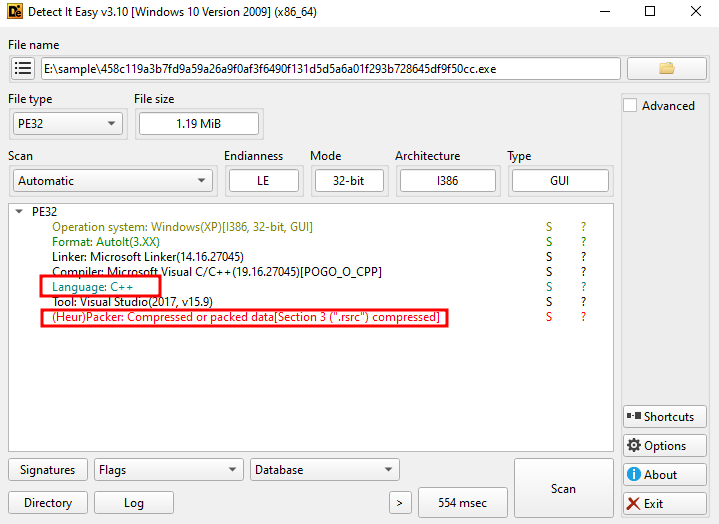 Figure 3: Detect It Easy
I have used a decompiler myAutToExe which statically converts .exe to .au3 there is dyamically way of doing same thing ExeToAut. After running tool we have 2 files one is .au3 script file and another is a bit intresting a file named thixophobia.
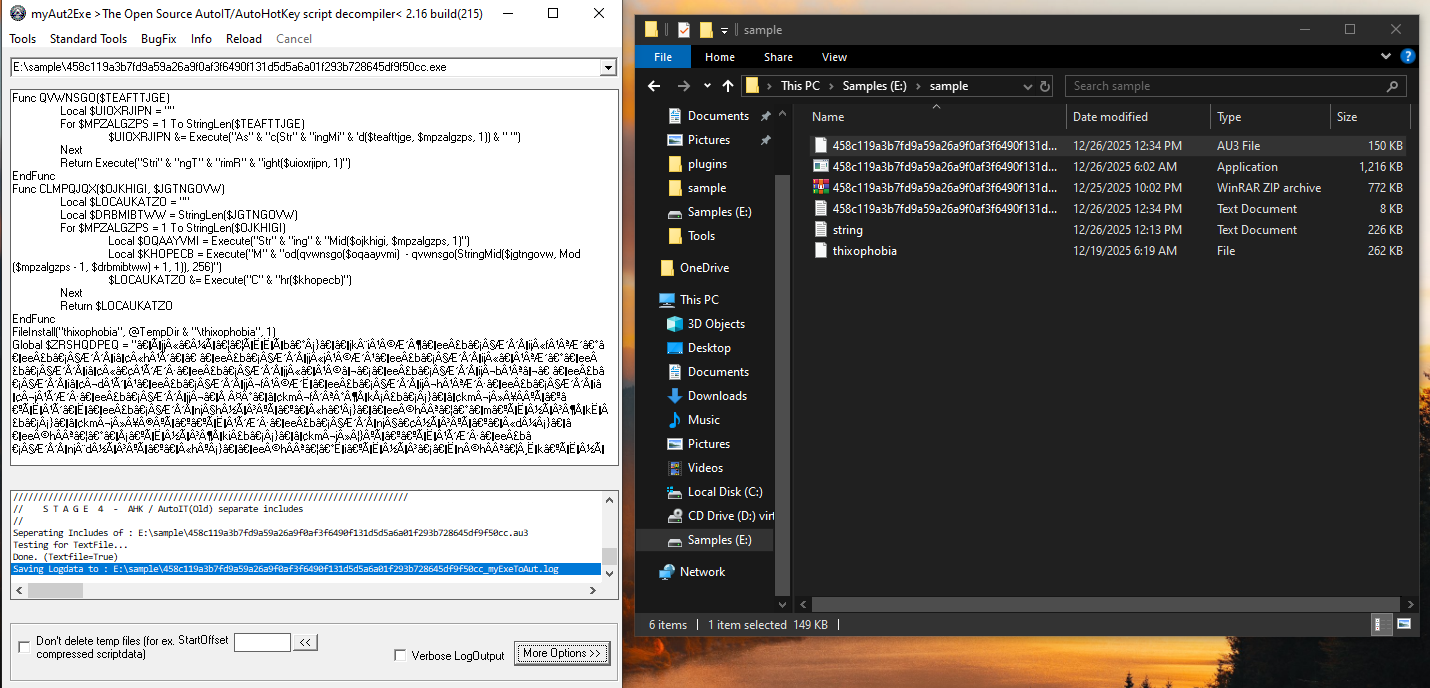 Figure 4: Decompiled exe to au3
I opened script file Notepad++ and started analysing, it was obfuscated but I will try to decode that. As we can see the first two custom functions, Func QVWNSGO converts string into numeric ASCII value with Execute() which hide function call to Asc() which is a common trick to bypass static scanners that look for specific function names. Func CLMPQJQX is primary decryption routine which takes 2 input likey a encrypted data and key , performing mathematical MOD operation which return original data.
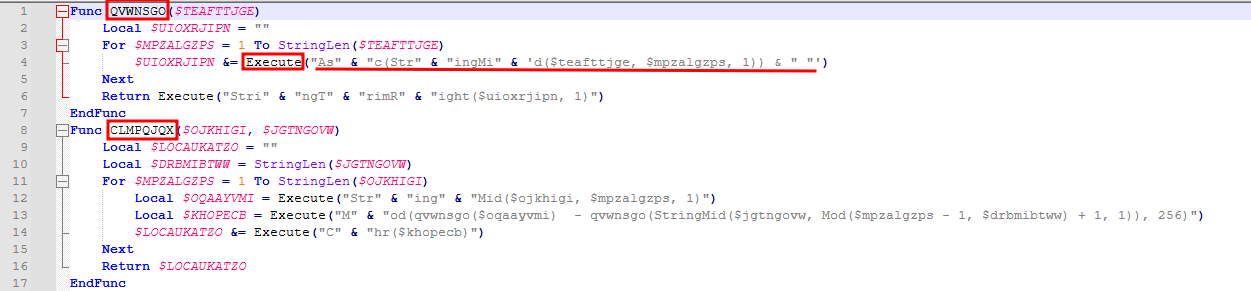 Figure 5: Custom Decryption function
Next thing FileInstall which tells script to extract a file named thixophobia in the temp directory and the file is bundled inside the original .exe binary.
 Figure 6: Extraction of file to TEMP directory
Then there is big encrypted blob $ZRSHQDPEQ which then calls Func CLMPQJQX with $ZRSHQDPEQ and key Tc55s2WqM as parameters which decryptes that encrypted data.
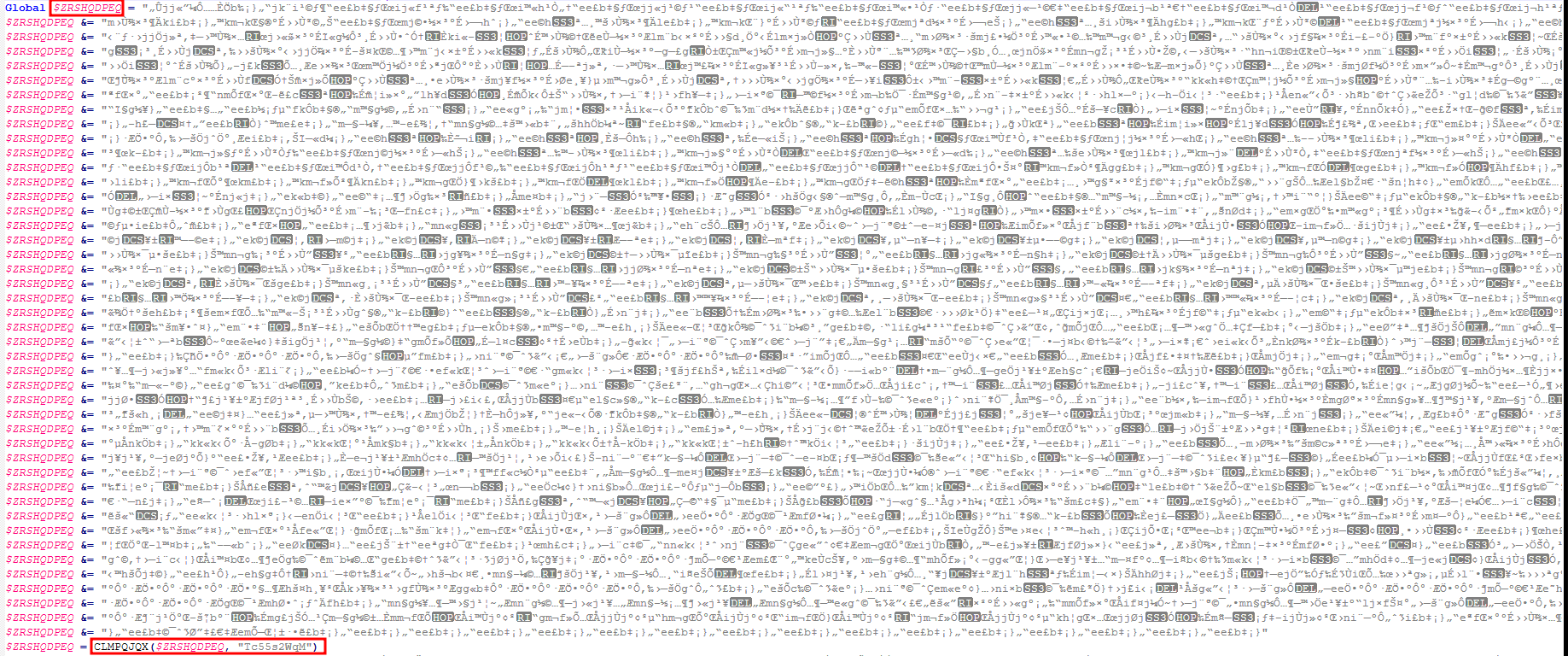 Figure 7: Decryption of Encrypted data
After decryption, it executes DllCall which decryptes Windows API at runtime using the same decryption function CLMPQJQX with the same key as above. And then uses DllStructCreate creates a space in memory that is the exact size of the decrypted data following with DllStructSetData which then puts decrypted data in created memory space and DllCallAddress jumps to specific memory location $knjlyskn + 0x23b0 and starts executing the instructions there likely shellcode.
 Figure 8: Execution of decrypted data
Then there 2 for loops which are quite big and since shellcode was already executed so this is likey to be just junk codes to hamper analysis and evade antivirus detection as it includes size checks on random files, it forces the CPU to run thousands of useless loops, the malware hopes the antivirus will “give up” and mark the file as safe.
 Figure 9: Long For loops
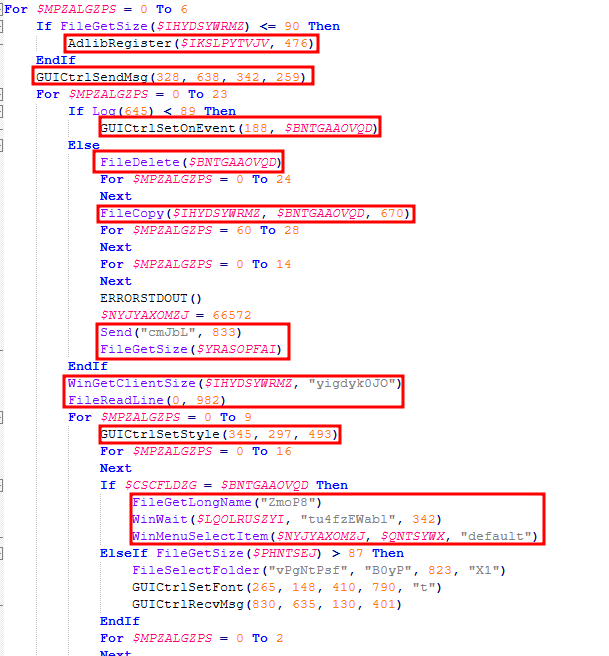 Figure 10: Size checks on random files and clicks on non-existing UI elements
Dynamic Analysis
On running the malware as intended it extracted the thixophobia inside Temp directory of the user.
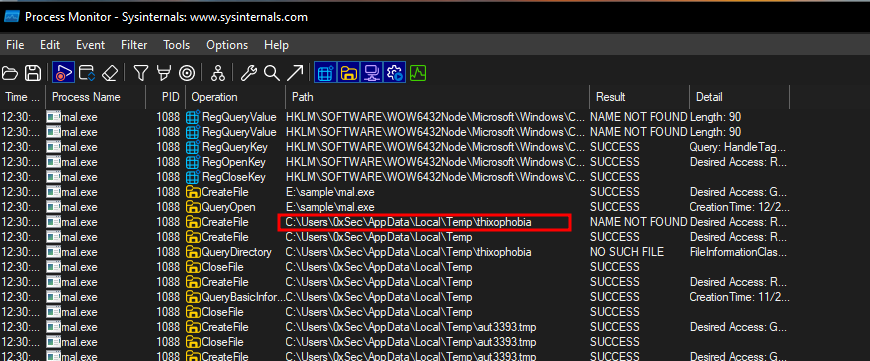 Figure 11: Extracts thixophobia in temp
It then terminates the binary and starts another binary under name RegSvcs.exe in suspended state to evade detection under a legitimate name i.e. Process Hollowing. So then i used pe-sieve for that process and found 4 malicious intents of that binary although it has legitimate name.
 Figure 12: Executes RegSvcs and kills initial binary
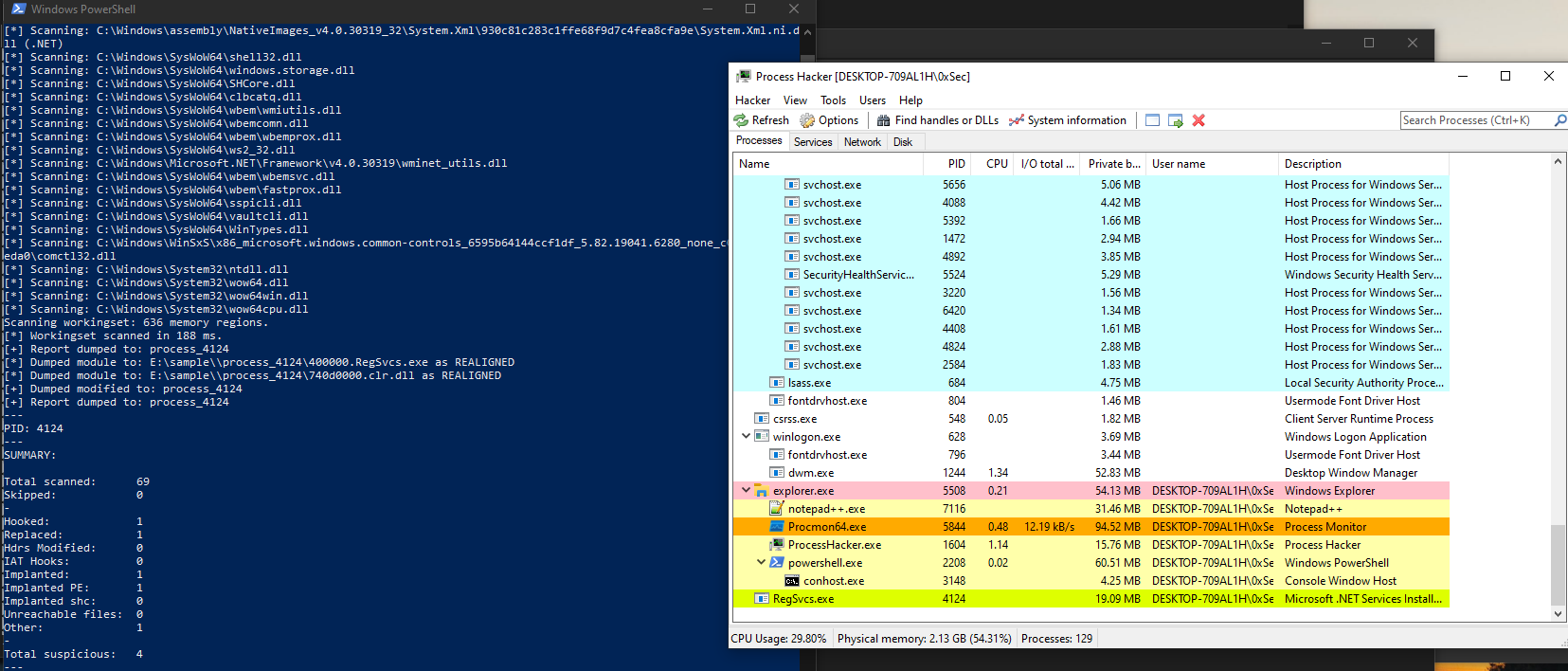 Figure 13: Scanning with pe-sieve
It dumped out a .exe file and on analysing it in DIE and PeStudio.
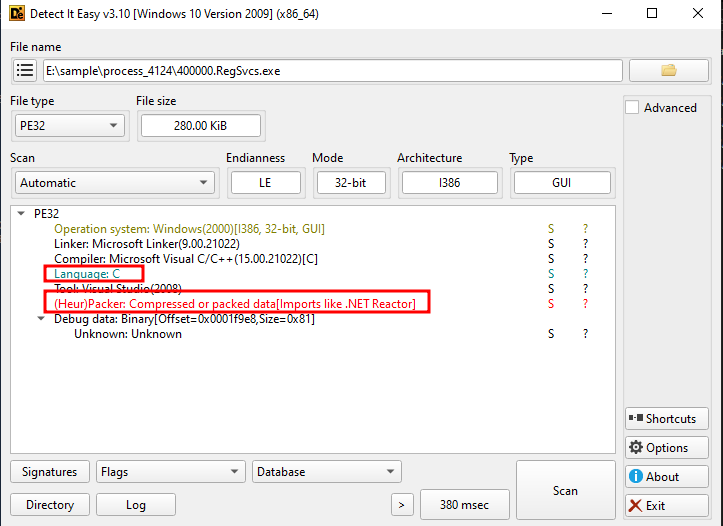 Figure 14: Detect It Easy
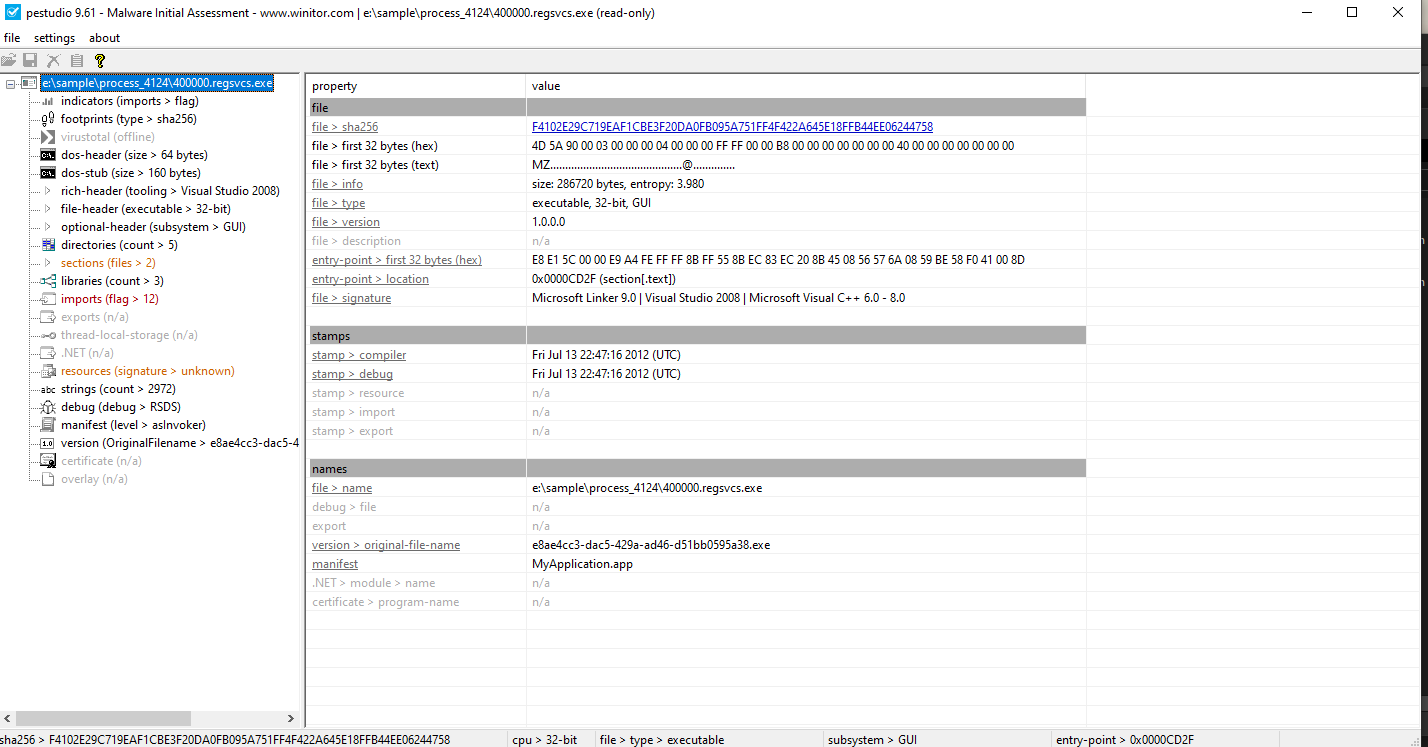 Figure 15: PeStudio
So I instantly gave to capa for analysis and returned some interesting results. Coming to the binary RegSvcs.exe I found that it is using modules like vaultcli.dll, WbemComm.dll, ws2_32.dll a socket dll, this means that this binary is sending information’s of the user to a remote host What I understand till now!.
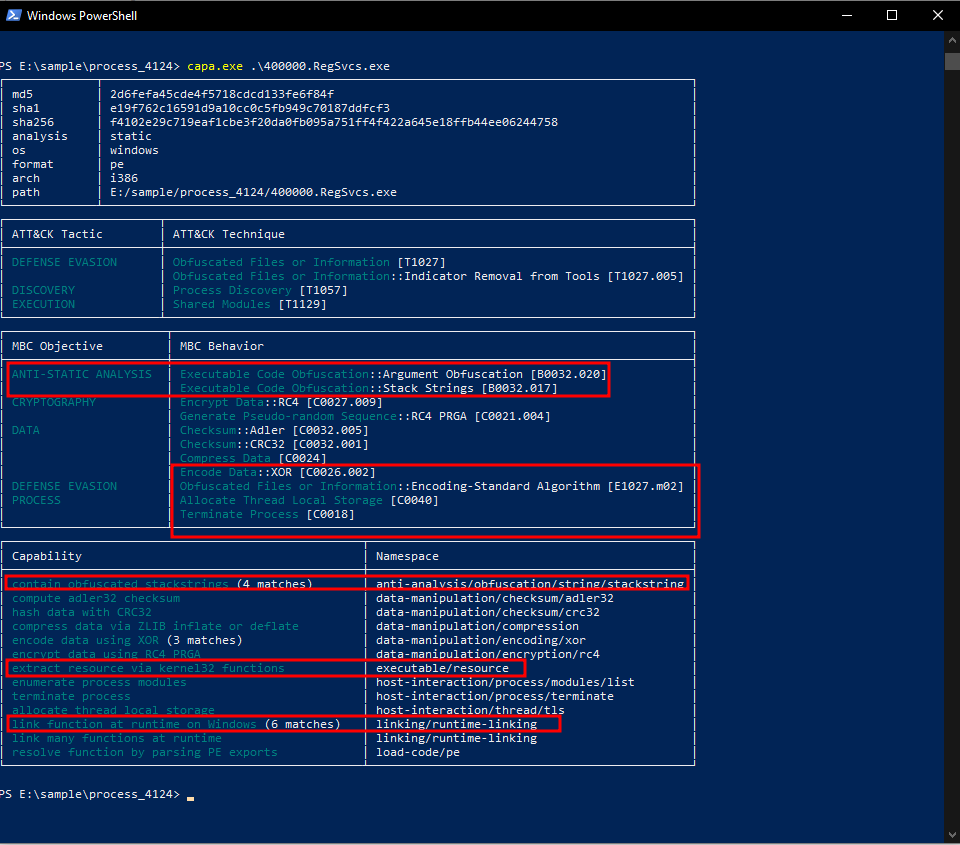 Figure 16: Obfuscated stack strings and many more..
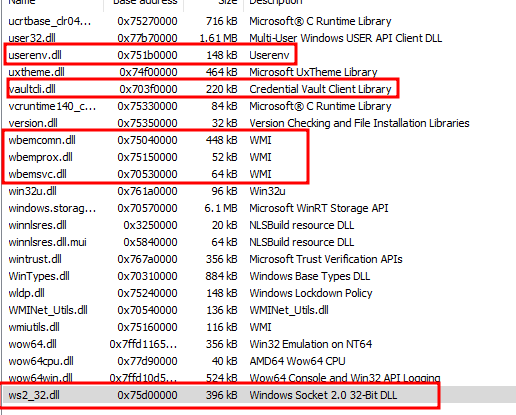 Figure 17: Interesting Modules
1
2
v3 = (const char *)sub_401650((int)&v36, v100); // Decrypts to "COR_ENABLE_PROFILING"
if ( getenv(v3) != (char *)&unk_41B2A0 )        // Compares result to "0"
Then I loaded it into IDA to analyze the binary further and first it checks some environment variable if it returns other than 0 i.e. COR_ENABLE_PROFILING was set to 1 which means .NET profiler is being used.
1
2
3
4
5
6
7
8
9
10
11
12
13
14
15
16
17
18
19
20
21
22
23
24
CurrentProcessId = GetCurrentProcessId();
Toolhelp32Snapshot = CreateToolhelp32Snapshot(8u, CurrentProcessId); //TH32CS_SNAPMODULE <==> 8u or 0x8
if ( Module32First(Toolhelp32Snapshot, &me) ) //checks first library
    {
      if ( !strcmp(me.szModule, (const char *)sub_401650((int)&v67, v98))
        || !strcmp(me.szModule, (const char *)sub_401650((int)&v36, v97)) )
      {
LABEL_4:
        CloseHandle(Toolhelp32Snapshot);
        return 0;
      }
      if ( Module32Next(Toolhelp32Snapshot, &me) )	//checks next library
      {
        while ( strcmp(me.szModule, (const char *)sub_401650((int)&v67, v98))
             && strcmp(me.szModule, (const char *)sub_401650((int)&v36, v97)) )
        {
          if ( !Module32Next(Toolhelp32Snapshot, &me) )
            goto LABEL_10;
        }
        goto LABEL_4;
      }
    }
LABEL_10:
    CloseHandle(Toolhelp32Snapshot);
Then it enters the module enumeration of itself to see list all of all modules that are being loaded into the memory of the loader prcess itself. It walks through each library loaded and checks some library that are not invited like dbghelp.dll it means a debugger is attached and it stops its execution.
1
2
3
4
5
6
7
8
9
10
ModuleHandleA = GetModuleHandleA(0); //gets its own base address for loading payload resouce
v8 = (const CHAR *)sub_401650((int)&v36, v102);
ResourceA = FindResourceA(ModuleHandleA, v8, (LPCSTR)0xA); //Search for resource name inside file for RT_RCDATA
hResInfo = ResourceA;
Resource = LoadResource(ModuleHandleA, ResourceA); //loads resource into RAM
v59 = LockResource(Resource);
v11 = SizeofResource(ModuleHandleA, ResourceA);
v12 = (size_t *)malloc(v11); //create space of exact size of encrypted data
v13 = operator new(0x40022u); //allocates roughly 262kb
Src = v13; //address to junk table
Now when it confirms that no debugger/sandbox is attached, it then moves to its payload execution. It then decryptes the encrypted data from stack using sub_401650 which performs a strings deobfuscation using hardcoded XOR keys, then search for that resource inside the file of constant RT_RCDATA which can hold raw binary data. It then loads the encrypted data into RAM and creates a empty space exactly size of encrypted data.
1
2
3
4
5
6
7
8
9
10
11
12
13
14
15
16
17
18
sub_401300(v64){
  v16[7] = 122;	//construct a 20 byte array
  v16[8] = -35;
  v16[9] = -35;
  v16[11] = -35;
  v16[17] = 50;
  v16[4] = -32;
  v16[14] = -32;
  v16[19] = -32;
  qmemcpy(v16, "xa2z", 4);
  v16[6] = 1;
  v16[10] = 102;
  v16[13] = 51;
  v16[15] = 55;
  v16[16] = 116;
  v16[18] = 1;
  v16[12] = 53;
  v16[5] = 98
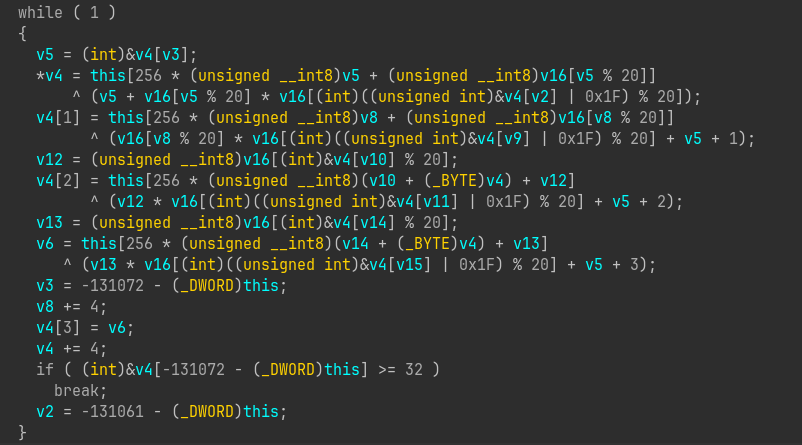 Figure 18: Performs XOR and multiplication operations
It calls a function sub_401300 with address of junk table as parameter and this function construct a 20 byte array and first 4 byte with xa2z and rest with hardcoded value like v16[7] = 122, v16[5] = 98 and performs some math operation and stops loop when exact 32 bytes of data is generated. Then it calls sub_401050 which crunch down the new 32 byte of data into single value and stores it in this[131104] as it processes 4 bytes per turn and runs 8 times and performs result = (byte_1 + byte_2 + byte_3 + byte_4 + result) % 256 for each loop.
1
2
3
4
5
6
7
8
9
10
11
12
13
14
Size = SizeofResource(ModuleHandleA, hResInfo);
if ( (int)Size / 1024 > 0 )	//process in chunks
{
  Src = v59;
  rgsabound.cElements = (char *)v12 - (_BYTE *)v59;
  lpString = (LPCSTR)((int)Size / 1024);
  do
  {
    sub_401560(Src, 0x400u, (char *)Src + rgsabound.cElements);
    Src = (char *)Src + 1024;
    --lpString;
  }
  while ( lpString );
}
It then process the data in chunks of 1kb and decryptes them using sub_401560 which is a Two-Pass Substitution Cipher now lets analyze this function.
1
2
3
4
5
6
7
8
9
10
11
12
13
14
15
16
17
18
19
20
else
    {
      v5 = Size - 1;
      for ( i = 0; i < v5; ++i )
        //use them as row and col to lookup enc data and depends on next value(Forward lookup)
        a4[i] = this[256 * (unsigned __int8)a4[i] + 0x10000 + (unsigned __int8)a4[i + 1]];
      a4[Size - 1] = this[256 * (unsigned __int8)a4[Size - 1] + 0x10000 + (this[131104] ^ 0x55)]; //last byte
      v7 = Size - 1;
      if ( v5 >= 1 )
      {
        do
        {
          //backward lookup
          a4[v7] = this[256 * (unsigned __int8)a4[v7] + 0x10000 + (unsigned __int8)a4[v7 - 1]];
          --v7;
        }
        while ( v7 >= 1 );
      }
      *a4 = this[256 * (unsigned __int8)*a4 + 0x10000 + this[131104]]; //first byte
    }
At first, it copies the encrypted data in working buffer a4 memcpy(a4, Src, Size); then enters a loop where it take a4[i] and a4[i+1] and use them as row and col and look for replacement value in encrypted data. Here, each byte’s new value depends on next one and since the last byte doesn’t have next byte so it XOR this[131104] with 0x55. Now next it does opposite i.e. takes last byte and previous byte a4[v7-1] and perform similar lookup and first byte is processed with this[131104], now its dependent to its neighbour from both side. This is more effective because changing any one byte of encrypted resource will lead in gibberish data.
1
2
if ( (int)Size % 1024 > 0 )
      sub_401560((char *)v59 + Size - (int)Size % 1024, (int)Size % 1024, (char *)v12 + Size - (int)Size % 1024);
Then it handles the left over byte because mostly files aren’t perfect multiple of 1024 bytes and it calculate the bytes to handle by Size - Remainder. Once all data is decrypted it then clear out the memory area where encrypted data resides by memset(v59, 0, Size); because the decrypted is now stored in v12 buffer and free up the resources.
1
2
3
v14 = *v12;
lpString = (LPCSTR)malloc(v14);
v15 = SizeofResource(ModuleHandleA, hResInfo);
It then allocates memory space for newly decrypted payload and calls sub_40AC60(lpString, &v94, v12 + 1, v15);. Now lets anayze what this function performs, first it setup some variables
1
2
3
4
v8 = a4;   // Total Resource Size
v7 = a3;   // Pointer to the Decrypted data
v9 = a1;   // Destination Buffer
v10 = *a2; // size of final payload
then calls sub_407270(&v7, "1.2.3", 56); which returns sub_4071A0(a1, 15, a2, a3); which is some what like a decompression function lets look into it.
1
2
if ( !a3 || *a3 != 49 || a4 != 56 )
    return -6;
It checks if version number i.e 1.2.3 starts with 1 to make sure it uses same version on which it was made, it then sets up function like malloc, free not directly but by using own internal pointer to that functions and then allocates exactly 9520 bytes in RAM. Then it performs some mathematical operation on value 15 and returns sub_4070F0 which fills the created space with some values and return to sub_40AC60.
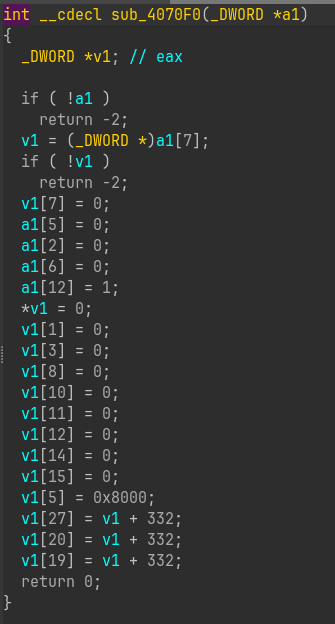 Figure 19: Fills allocated space with some values
Now it calls the decompression function and handles success and failure.
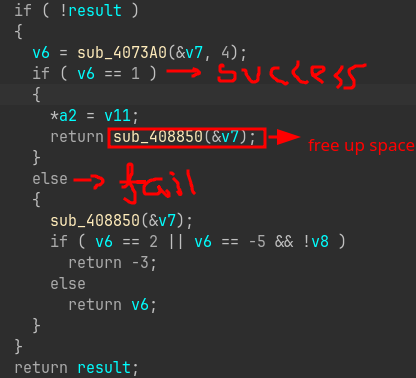 Figure 20: Handles success and failure
Now coming back to main function now it clear out the memory allocated for v12 and skips first 14 bytes so that it points exactly at payload v17 = v16 + 14;. Then it load some library since AgentTesla is a .NET based malware so something related to that might be mscoree.dll which is core library of .NET framework. And after it setup required things for .NET it then executes the decompressed malware in memory. The Agent Tesla now begins searching for Chrome passwords, Outlook emails, and FTP credentials.
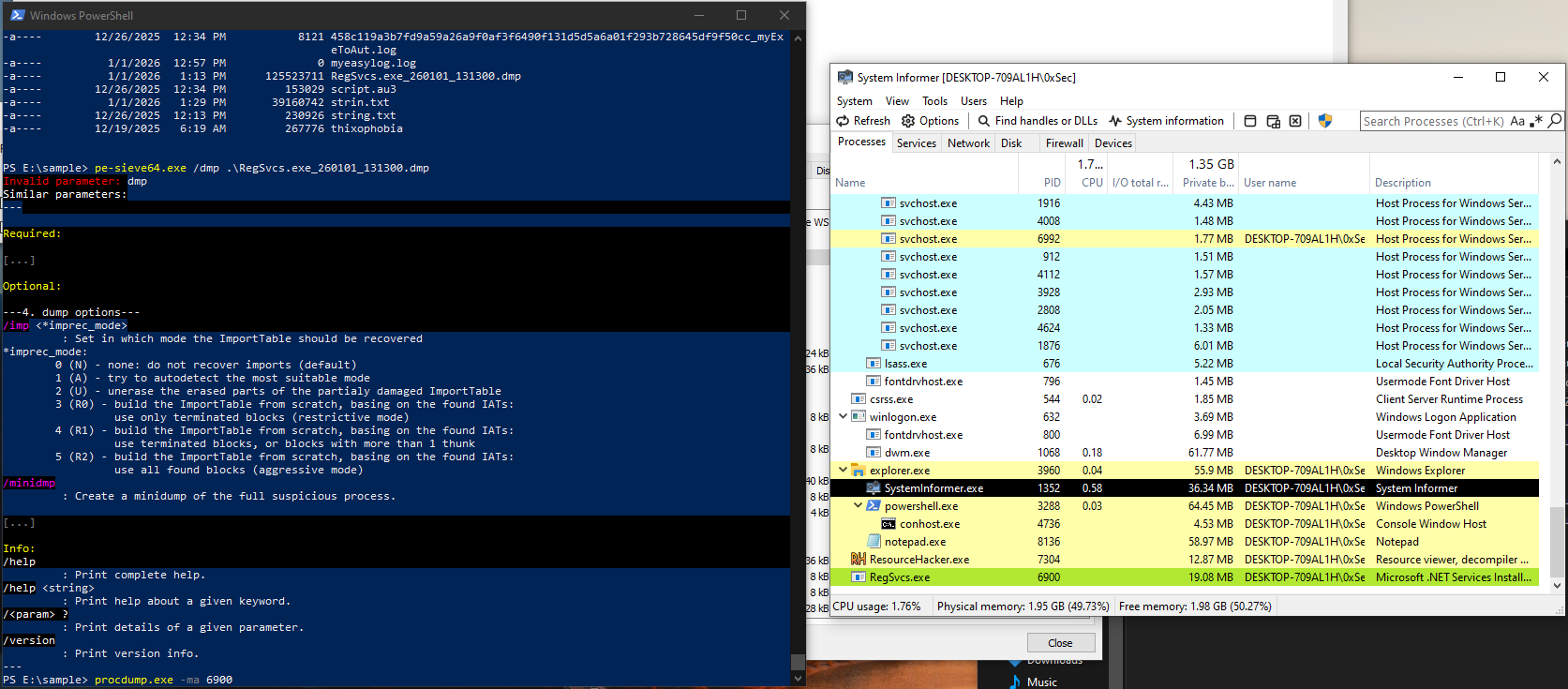 Figure 21: Dump everything from running process
Now lets see how can we extract the malware confiurations, first i ran the malware and let it execute for 30 seconds to complete all its needed things so that the final payload start executing keeping SystemInformer opened. Then go to properties of the process and go in to memory tab and look for the RWX protection and there i saw a memory address mapped of 256kb that caught my attention. Then i used procdump to dump out everything from running process. Now i ran strings on the dmp file and stored it in a new file.
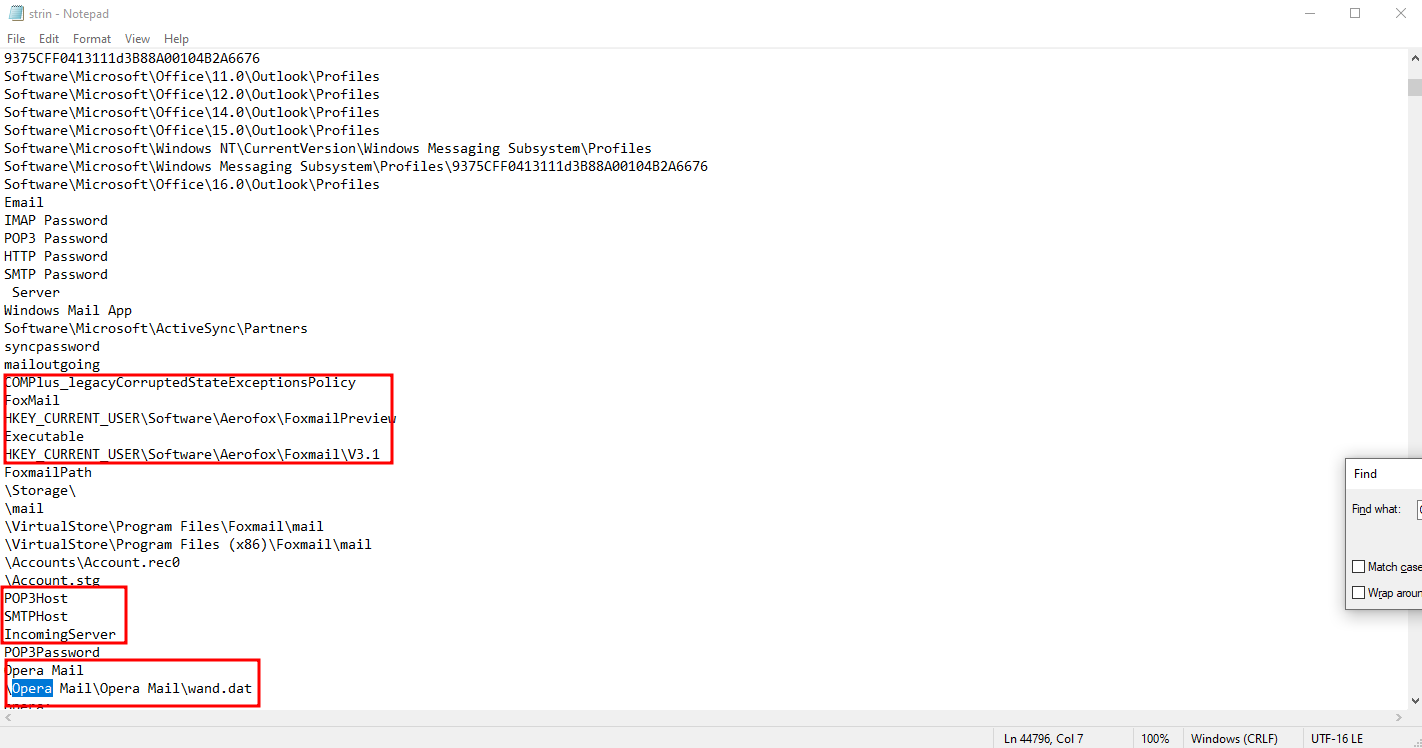 Figure 22: Extracting important info
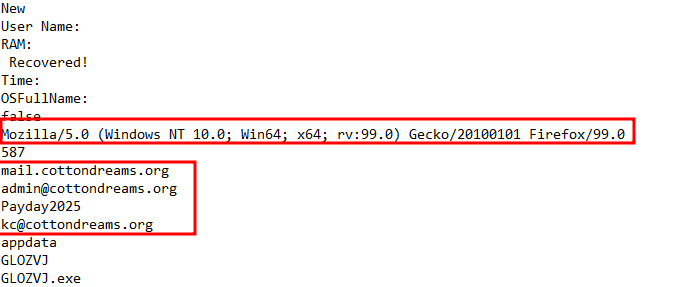 Figure 23: C2 domains and email with password
Since its a infostealer I searched for things like Opera, Chrome and I got it, it was extracting each of these info including FTP, SFTP, logging keystrokes, system information, VNC passwords and so on. I also find the domain it is communicating to share these informations mail.cottondreams.org and email addresses kc@cottondreams.org, admin@cottondreams.org and a likely a password PayDay2025.
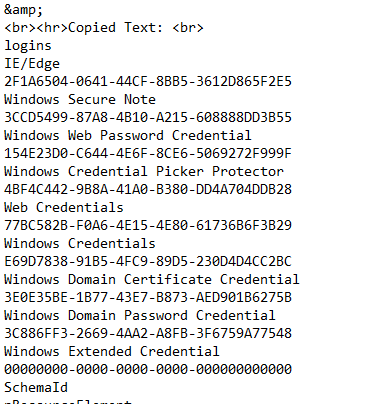 Figure 24: More Informations
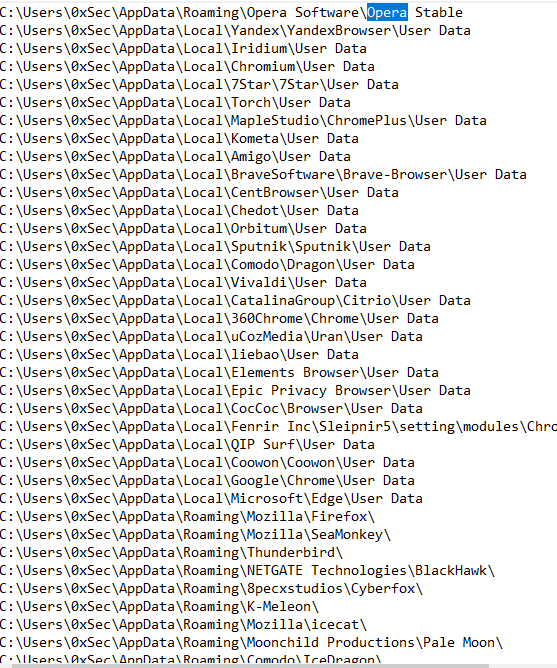 Figure 25: Exracting info from different browsers
IOCs
SMTP Server - mail.cottondreams.org Sender Mail - kc@cottondreams.org Receiver Mail - admin@cottondreams.org Port - 587 SMTP Auth Password - PayDay2025